
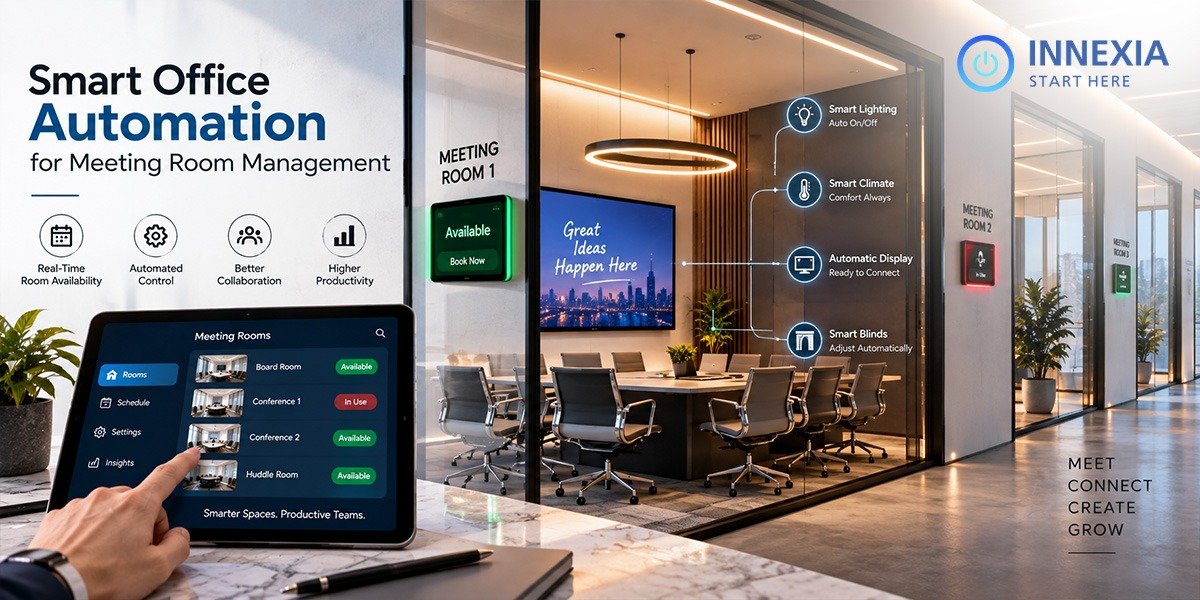
Meeting rooms should support collaboration not create more work. Yet employees in many offices still lose valuable time searching for an available room, resolving double bookings, connecting presentation equipment, or waiting for a meeting to begin.
As workplaces become more flexible and hybrid, manual room management becomes increasingly difficult. A conference room may appear reserved on a calendar but remain empty. Another room may be occupied without a booking. Employees may reserve a large boardroom for a two-person discussion while smaller spaces sit unused. Technical problems can delay both in-room and remote participants.
Smart office automation brings these disconnected activities into one coordinated experience. With Smart Meeting Room Automation, organizations can simplify reservations, automate room controls, understand space usage, and make every meeting easier to start and manage.
What Is Smart Meeting Room Automation?
Smart meeting room automation uses connected software, sensors, displays, audiovisual equipment, and building controls to manage meeting spaces with less manual effort. Instead of treating the calendar, room display, video conferencing system, lighting, and occupancy data as separate tools, automation connects them through a consistent workflow.
A Meeting Room Automation System can support tasks such as:
- Finding and reserving an appropriate room
- Displaying live room availability outside the space
- Checking attendees in when a meeting begins
- Releasing a room when nobody arrives
- Starting video, audio, and presentation equipment
- Adjusting lighting, temperature, blinds, and other room settings
- Detecting actual occupancy through sensors
- Collecting usage data for workplace planning
- Reporting equipment or room issues to support teams
The goal is not to add more technology to the office. It is to remove unnecessary steps from the employee experience.
Why Traditional Meeting Room Management Falls Short
Calendar-based booking is useful, but a calendar alone cannot show what is really happening inside a workplace. It records intention, not actual usage.
This gap creates several common problems.
Ghost meetings
A room remains reserved even though the organizer cancels informally or never arrives. Other employees see the room as unavailable and waste time looking elsewhere.
Double bookings and room conflicts
When teams use different calendars or informal reservation methods, two groups can arrive expecting the same space.
Rooms that do not fit the meeting
Employees may book the first room they find without considering capacity, video conferencing needs, accessibility, or equipment. This leads to inefficient use of both small rooms and premium boardrooms.
Slow meeting starts
Disconnected cables, unfamiliar control panels, incorrect display inputs, and audio problems can turn the first several minutes of a meeting into technical setup time.
Limited workplace visibility
Facilities and IT teams may know how many bookings were made but not how many people actually used each space, when demand was highest, or which equipment caused repeated issues.
Smart Meeting Room Management addresses these problems by connecting scheduling with real-time room status, automated controls, and actionable data.
How a Meeting Room Automation System Works
A modern solution generally connects five layers of the meeting-room experience.
1. Room discovery and booking
Employees search for rooms according to time, location, capacity, and available amenities. Integration with business calendars can allow users to reserve a room through tools they already use, while mobile apps, workplace portals, or room panels support on-the-go and walk-up booking.
2. Check-in and automatic release
The organizer confirms arrival through a room panel, app, or occupancy signal. If nobody checks in within a defined period, the system can release the reservation. This returns unused capacity to the workplace and reduces ghost bookings.
3. Occupancy awareness
Connected sensors can indicate whether a space is occupied and, depending on the approved technology and configuration, help estimate how the room is being used. Comparing booking data with real occupancy gives workplace teams a more accurate picture than calendar data alone.
4. Automated meeting controls
When the meeting starts, the room can activate predefined settings. Displays and conferencing devices can power on, the correct source can be selected, lighting can adjust, and the meeting interface can present clear join controls. A consistent setup across rooms reduces confusion and support requests.
5. Analytics and administration
A central dashboard can help authorized teams review room demand, booking behavior, occupancy patterns, cancellations, no-shows, equipment health, and recurring issues. These insights support decisions about office layouts, technology investments, and maintenance priorities.
Key Benefits of Smart Meeting Room Management
Faster, more productive meetings
Employees should be able to enter a room and begin collaborating. Automated device setup and simple controls reduce the time spent preparing displays, conferencing tools, microphones, and lighting.
Better space utilization
Booking rules, occupancy signals, and automatic room release help organizations make existing spaces available to more people. Usage data can also reveal whether the office needs more focus rooms, small huddle spaces, training rooms, or large conference rooms.
A more consistent hybrid experience
Hybrid participants need to see, hear, and contribute clearly. A well-designed automation system coordinates room technology so employees do not need to learn a different process in every space. Consistency makes meetings more inclusive for both remote and in-room attendees.
Reduced pressure on IT and facilities teams
Central monitoring can make it easier to identify offline devices, recurring room faults, and spaces that need attention. Employees can also report issues through a structured interface, giving support teams clearer information.
More efficient energy use
When integrated with approved building systems, meeting-room status can inform lighting, climate, and device behavior. Equipment does not need to remain fully active when a room is vacant. Energy savings will depend on the building, integrations, policies, and actual usage patterns.
Data-informed workplace decisions
Reliable occupancy and booking trends can replace assumptions with evidence. Leaders can evaluate whether rooms match employee demand before expanding, redesigning, or reducing office space.
Essential Features to Look For
Not every room-booking product delivers complete automation. When comparing solutions, consider whether the system offers:
- Real-time availability and room status
- Calendar integration
- Search filters for capacity, equipment, location, and accessibility
- Room panels and mobile-friendly booking
- Check-in, cancellation, and automatic-release rules
- Occupancy-sensor integration
- Support for video conferencing and room AV
- Central device monitoring and alerts
- Usage dashboards and exportable reports
- Role-based access and administrative controls
- Multi-location management
- Integration options for lighting, climate, blinds, or other building systems
- Scalable configuration for different room types
The right feature set depends on the workplace. A ten-room office and a multi-site enterprise will not need the same administration model, integrations, or deployment approach.
Smart Meeting Room Automation in Action
Consider a hybrid project meeting scheduled for 10:00 a.m.
Before the meeting, the organizer searches for a room that seats eight people and includes video conferencing. The reservation appears in the company calendar and on the room display.
When the first attendee arrives, the booking is confirmed. The room activates its meeting-ready settings, and participants join through a clear interface. If the organizer had not arrived or checked in, the room could have been released after the company’s chosen grace period.
After the meeting, the system returns the room to its available state. Authorized workplace teams can later review booking and usage trends without relying only on employee recollection.
This is the real value of automation: many small actions happen reliably in the background, while employees focus on the meeting itself.
How to Plan a Successful Implementation
Audit current meeting-room problems
Begin with evidence. Identify common booking conflicts, average meeting sizes, no-show patterns, recurring support tickets, and rooms that are consistently overused or underused.
Define the desired employee journey
Map the process from finding a room to ending a meeting. Decide how users will book, check in, start calls, request support, and extend or end reservations.
Standardize room types
Create repeatable standards for huddle rooms, medium conference rooms, boardrooms, and training spaces. Consistent controls and equipment reduce training needs and simplify support.
Confirm integration requirements
Review calendars, identity systems, video platforms, AV devices, workplace applications, sensors, and building controls. Check both technical compatibility and operational ownership.
Protect privacy and security
Collect only the data required for the intended purpose. Define access permissions, data retention, network segmentation, update responsibilities, and vendor security requirements. Occupancy insights should support workplace operations without creating unnecessary employee surveillance.
Pilot before expanding
Start with a representative set of rooms, gather employee feedback, measure results, and refine the setup. A controlled pilot can uncover workflow and integration issues before a wider rollout.
Track meaningful outcomes
Useful measures may include room-release rates, average meeting start delays, utilization by room type, support-ticket volume, employee satisfaction, and equipment availability. Compare results with a pre-deployment baseline.
Build a Smarter Meeting Experience with Innexia
Meeting-room automation is most effective when technology becomes almost invisible. Employees can find the right space, start meetings with confidence, and collaborate without unnecessary delays. Meanwhile, workplace teams gain the visibility needed to manage rooms, technology, and resources more effectively.
Innexia helps organizations move toward connected, efficient, and user-friendly meeting environments. Whether the priority is simplifying reservations, improving hybrid collaboration, centralizing room control, or gaining clearer workplace insights, the right strategy begins with your rooms, users, and business goals.
Ready to explore Smart Meeting Room Automation for your workplace? Contact Innexia to discuss a meeting-room management solution designed around the way your teams work.
Frequently Asked Questions
What is Smart Meeting Room Automation?
Smart Meeting Room Automation connects room booking, occupancy information, audiovisual equipment, conferencing tools, and optional building controls. It reduces manual tasks and creates a more consistent meeting experience.
What does a Meeting Room Automation System include?
Depending on the solution, it may include scheduling software, room displays, check-in tools, occupancy sensors, AV and conferencing control, device monitoring, workplace analytics, and integrations with lighting or climate systems.
How does Smart Meeting Room Management reduce no-shows?
The system can require attendees to check in and automatically release a reservation when nobody arrives within a defined grace period. This makes unused rooms available to other employees.
Can meeting-room automation work with existing calendars?
Many systems are designed to integrate with common business calendar platforms. Compatibility should be confirmed during solution planning, especially when an organization uses multiple tenants, custom security policies, or legacy systems.
Is smart meeting-room technology suitable for hybrid work?
Yes. It can help standardize how employees join calls, share content, use cameras and microphones, and manage room settings. The exact experience depends on the chosen conferencing and AV integrations.
How should a company choose a meeting-room automation solution?
Evaluate employee workflows, calendar and AV compatibility, occupancy requirements, security, administration, analytics, scalability, support, and total lifecycle cost. A pilot deployment is often the best way to validate the experience.